See your phone notifications on your TV
NotifyTV puts calls, WhatsApp messages and other alerts from your Android phone on your Android TV or Google TV, as small popups over whatever you are watching. You choose the apps; one-time codes stay on your phone.
Free · Install the phone app and the TV app · Android 8.0 or newer
- Stays on your Wi-Fi
- No account needed
- Multiple phones, one TV
Live preview of the popups NotifyTV draws on your TV
Works with Android TV & Google TV
- Google TV Streamer
- Chromecast with Google TV
- Sony Bravia
- TCL
- Hisense
- Philips
- Xiaomi
- NVIDIA Shield TV
- onn. 4K streaming box
Needs an Android phone. Not available for iPhone, Samsung TVs, LG TVs, Roku, Apple TV or Amazon Fire TV. Check your TV →
Install. Pair. Watch.
Two free apps, one Wi-Fi network, no account. Most people are set up in a few minutes.
Install both apps
Get NotifyTV on your Android phone and on your Android TV or Google TV from Google Play. Both are free.
Pair in seconds
Scan the QR code on your TV, let the phone find the TV on your Wi-Fi, or type the TV’s IP address. No account needed.
Pick apps and watch
Check which apps reach the TV (common messaging apps are on to start). Calls, messages and alerts now pop up over whatever you watch, then get out of the way.
Send a notification to this TV
Tap a button and watch the popup appear, just as it does on your TV. Then change the privacy settings, the position or turn on calls-only mode and send it again.
From the phone
Phone privacy
TV settings
On a call card use ← → and Enter, like the TV remote. Esc works as Back.
Made for the living room, not the lock screen
NotifyTV is built around a shared screen: small popups, privacy by default and controls for everyone in the house.
See who’s calling
SIM and WhatsApp calls show the caller on the TV. Decline phone calls with the remote; the popup closes when you answer.
You pick the apps
Common messaging apps are switched on to start; turn off any you don’t want or add others. When you install a new app, NotifyTV asks if it should forward it.
Private on a shared screen
Show the whole message, or only who it’s from. Messages that look like one-time codes are hidden; the TV just says one arrived.
One TV, every phone
Connect several phones to one TV. Popups show whose phone they came from, and each phone can be turned off on its own.
Quiet when you want it
Pause for 1 hour or until 7 AM, or switch to calls only for movie night. Calls still get through a pause.
Popups made for TV
Six positions, 3 to 30 seconds on screen, optional sounds. Press OK to read a long message in full.
Ring your phone from the TV
Lost it in the sofa again? Ring any connected phone from the TV, loudly, using the alarm sound.
Battery alerts
The TV tells you when your phone’s battery runs low or has charged to the level you choose.
Better than mirroring, calmer than your phone
Screen mirroring puts your whole phone on the TV. Checking your phone means pausing. NotifyTV shows only what you chose, in a corner, and lets the film carry on.
| What you get |  NotifyTV NotifyTV | Screen mirroring | Checking your phone |
|---|---|---|---|
| Your show keeps playing full screen | Mirroring replaces the TV picture | ||
| See who’s calling without getting up | PartlyOnly while you mirror | ||
| Only the apps you choose | Everything on the phone screen shows | — | |
| One-time codes stay off the big screen | Hidden by default | — | |
| Phone can stay locked on the charger | Same Wi-Fi | Must stay awake and sharing | |
| Several phones on one TV | One phone at a time | — |
Questions people ask before installing
Straight answers about TVs, calls, privacy and ads. Still unsure? The setup guide covers the details.
Which TVs does NotifyTV work on?
Any TV or streaming device with Google TV, or Android TV 8.0 or newer, and the Google Play Store. For example Sony, TCL and Hisense TVs with Google TV, Google TV Streamer, Chromecast with Google TV, NVIDIA Shield and onn. Google TV boxes. Your phone needs Android 8.0 or newer.
Does it work with iPhone, Samsung, LG, Roku or Fire TV?
No. The phone app is Android only. The TV app comes from Google Play, so it does not run on Samsung (Tizen) or LG (webOS) TVs, Roku, Apple TV or Amazon Fire TV, which has no Google Play. If you plug a Google TV streaming device into one of those TVs, NotifyTV works while you use that device.
Can I see phone calls on the TV? Can I answer them?
You can see them. Incoming calls, both regular SIM calls and calls from apps such as WhatsApp, show the caller on the TV. While a phone call rings you can decline it with your TV remote or dismiss the popup. You answer on your phone, and the popup closes by itself when the call is answered or ends.
Does it show WhatsApp messages?
Yes. WhatsApp is switched on automatically if it’s installed, and you can turn it off or choose other apps in Select Apps. Long messages show a preview and you press OK on the remote to read the rest. You still reply on your phone.
Do my phone and TV need to be on the same Wi-Fi?
Yes. NotifyTV sends notifications straight from your phone to your TV over your home network; they do not pass through a NotifyTV server. You pair by scanning the QR code on the TV, by letting the phone find the TV automatically, or by typing the TV’s IP address.
Can other people in the room read my messages?
Only if you let them. In Sender only mode the TV shows who a message is from but not the message text. Messages that look like one-time codes (OTPs) are hidden by default, so the TV only says that a code arrived. You can also pause NotifyTV for 1 hour or until 7 AM, or switch to calls only.
Do I need an account? Where do my notifications go?
No account is needed. Notifications travel from your phone to your TV over your Wi-Fi, encrypted for each session, and are not uploaded to a NotifyTV cloud. The apps are free because they show ads. Google AdMob, Firebase and Microsoft Clarity provide the ads and usage analytics; they collect device identifiers and usage data, including which apps post notifications (not what the notifications say).
Is NotifyTV free? Are there ads?
Yes, both apps are free and supported by ads: banners and ad cards in the app screens, sometimes a full-screen ad on the phone, and now and then a short sponsored card among your TV popups. No feature is locked behind a payment.
Can the whole family use one TV?
Yes. One TV can receive from several phones, and each popup can show which phone it came from. On the TV you can rename each phone, turn one phone off without affecting the others, and ring a phone to find it.
What happens if the Wi-Fi drops or the TV is switched off?
The phone reconnects by itself when the TV is back, including after a TV restart or an app update, and notifications that arrived during a short drop-out (up to a minute) are delivered when it reconnects. While the TV stays off, the phone stops trying every few seconds to save battery. On some phones you should also let NotifyTV run in the background in the battery settings.
Guides & articles
How-tos and explainers for getting more out of your Android TV.
7 min read
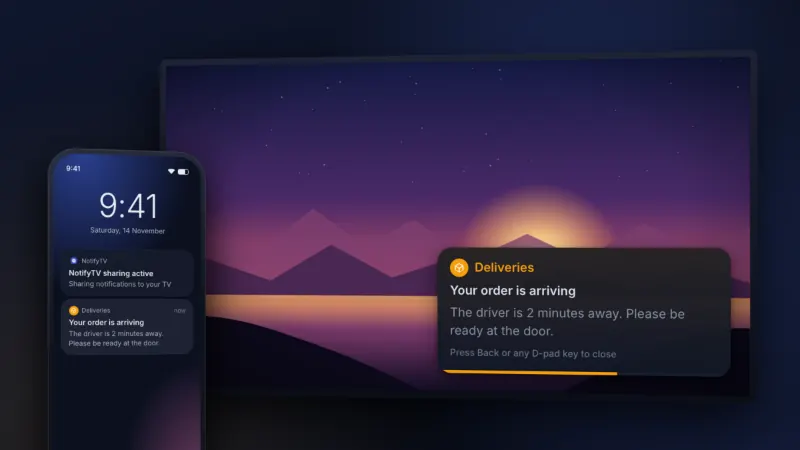
How to See Phone Notifications on Your TV (2026 Guide)
Learn how to see phone notifications on your TV with NotifyTV. Get calls, messages, and alerts on your Android TV screen without touching your phone.
Read article
9 min read
Best TV Apps 2026 (Free & Paid) | Complete Guide
Discover the best TV apps of 2026 for streaming, live TV, and free content. Compare Netflix, YouTube TV, Samsung, Roku, Apple TV and more.
Read article
7 min read
Android TV vs Google TV: Key Differences Explained
Android TV vs Google TV — what's the real difference? Compare features, app compatibility, and find out which smart TV platform is best for you in 2026.
Read article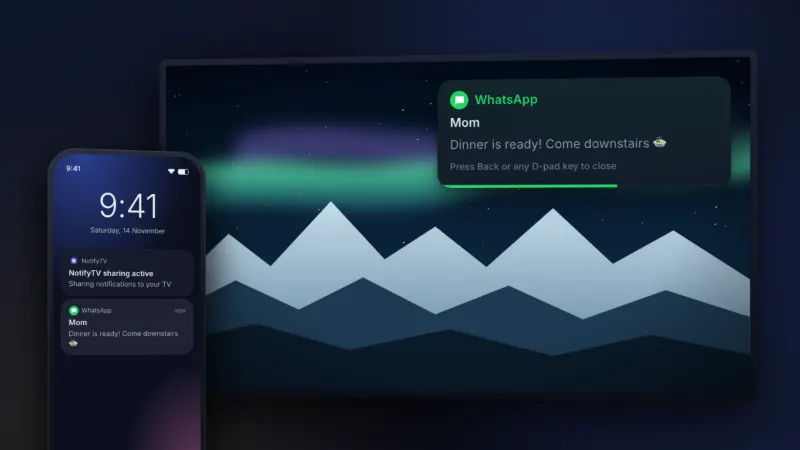
6 min read
Introducing NotifyTV: Phone Notifications on Your Android TV
Meet NotifyTV — the free Android app that shows your phone notifications on your TV in real time. Privacy-first, family-ready, and built for the living room.
Read article
Featured On