Guide
WhatsApp on a smart TV: what actually works, brand by brand
There’s no WhatsApp app for any smart TV, not Samsung, LG, Sony or Xiaomi. But depending on your TV you can watch WhatsApp videos on the big screen, and on Android TV or Google TV you can see your WhatsApp messages and calls as they arrive.
Updated
Short answer
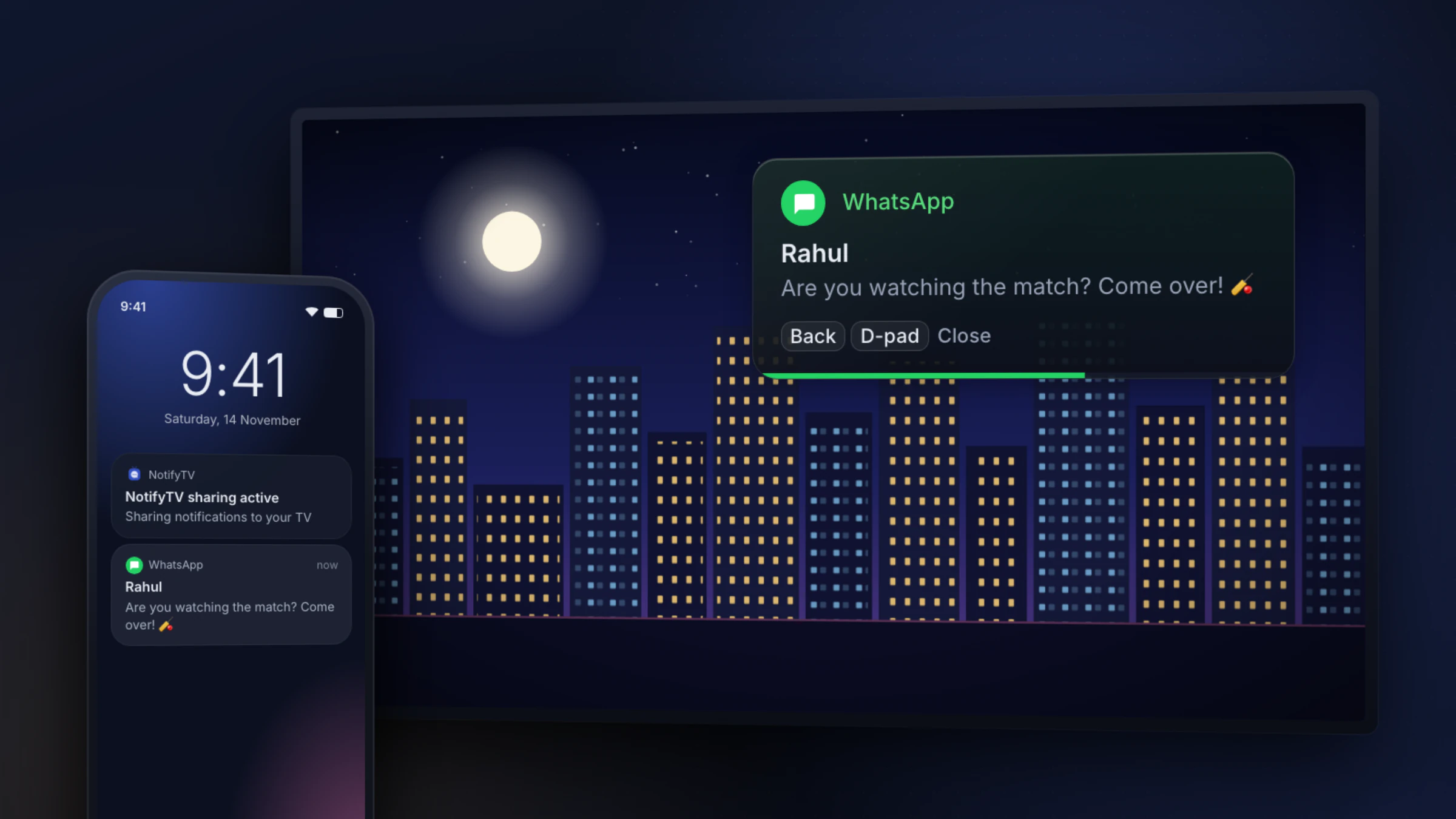
You can’t install WhatsApp on a smart TV: WhatsApp doesn’t make a TV app for any brand. On almost any TV you can mirror or cast your phone to watch a WhatsApp video. On a TV with Android TV or Google TV (Sony, TCL, Vu, Acer, OnePlus and many Xiaomi models), NotifyTV shows your WhatsApp messages and incoming calls as small popups over what you’re watching. You still reply and talk on your phone.
What you can do with WhatsApp on your TV
| Your TV runs | Install WhatsApp? | See messages and calls? | Watch a WhatsApp video? | WhatsApp video call? |
|---|---|---|---|---|
| Android TV / Google TV Sony Bravia, TCL, Vu, Acer, OnePlus, Xiaomi X Pro, Google TV models from Hisense and Philips, Google TV Streamer | No | Yes, as popups with NotifyTV | Yes: cast your phone screen | No |
| Samsung (Tizen) All Samsung smart TVs | No | No (NotifyTV can’t be installed) | Yes: Smart View from a Galaxy phone | No |
| LG (webOS) All LG smart TVs | No | No (NotifyTV can’t be installed) | Yes: Screen Share | No |
| Fire TV Fire TV Stick, Xiaomi FX series and other Fire TV models | No | No (no Google Play) | On models with Mirroring | No |
| Roku Roku TVs and players | No | No (no Google Play) | Yes: screen mirroring from many Android phones | No |
| JioTele OS Some Thomson, Kodak, BPL, JVC and Blaupunkt TVs | No | No (no Google Play) | Check your TV’s manual | No |
Checked on 17 November 2026. Not sure what your TV runs? Use the compatibility checker: if the TV has the Google Play Store, it runs Android TV or Google TV.
Why there’s no WhatsApp app for TVs
WhatsApp runs on one phone, plus up to four linked devices: another phone, an Android tablet or iPad, Windows and Mac computers, WhatsApp Web, some watches, Meta glasses and Quest headsets, and Android Auto or CarPlay in the car. TVs aren’t on that list (checked on 17 November 2026), so no TV app store has WhatsApp in it, whatever the brand.
You’ll find guides that tell you to download the phone app’s APK file and install it on an Android TV. We don’t recommend it: the app is built for a touchscreen, not a remote, most TVs have no camera or microphone, it gets no updates from Google Play, and installing apps from unknown websites is a security risk for an account that holds all your chats.
What about WhatsApp Web in the TV’s browser?
WhatsApp recommends Chrome, Firefox or Edge for WhatsApp Web, and also supports Opera and Safari on a Mac. Smart TV browsers aren’t on that list, and Android TV and Google TV usually don’t come with a browser (Sony says its TVs don’t), so you’d have to install one first. We haven’t tested WhatsApp Web on a TV. Even where it loads, you’re typing with a remote, the chat covers whatever you were watching, and everyone in the room can read it.
See WhatsApp messages and calls on Android TV or Google TV
If your TV runs Android TV or Google TV and you have an Android phone, NotifyTV covers the everyday part: knowing who messaged or is calling without picking up the phone. The phone app forwards WhatsApp notifications over your home Wi-Fi and the TV shows them as popups.
- Messages show the sender and the text. Long ones show a preview; press OK on the remote to read the rest.
- Calls show who’s calling. For WhatsApp calls you answer or decline on your phone; the popup closes when the call is answered or ends.
- WhatsApp Business works too: switch it on in the phone app’s Select Apps list.
How to set it up
- 1
Check your TV
It needs Google TV, or Android TV 8.0 or newer, with the Google Play Store. Your phone needs Android 8.0 or newer; iPhones aren’t supported. Check your TV.
- 2
Install NotifyTV on the TV and the phone
Both apps are free on Google Play.
- 3
Pair them
Scan the QR code on the TV with the phone app, let the phone find the TV on your Wi-Fi, or type the TV’s IP address.
- 4
Send yourself a test
WhatsApp is switched on automatically if it’s installed. Ask someone to message you, or tap Test Notification in the phone app.
The WhatsApp on Google TV guide goes into more detail for Android TV and Google TV owners, and the setup guide covers every step with fixes for common problems.
How to watch a WhatsApp video on your TV
To show a video someone sent you on WhatsApp, put your phone’s screen on the TV. The video plays from the phone, so keep it awake and on the same Wi-Fi as the TV. The names below are from each maker’s help pages (checked on 17 November 2026); menus differ between phones.
- Android TV / Google TV: open the Google Home app on your phone, touch and hold your TV’s tile, tap Cast, then Cast my screen.
- Samsung TV: on a Galaxy phone, open the Quick Panel, tap Smart View and pick your TV.
- LG TV: open your phone’s Quick Settings, tap Screen Share (it may be called Smart View or Cast), pick the TV and press OK on the TV remote to accept.
- Fire TV: hold the Home button on the Fire TV remote and choose Mirroring, then connect from your phone’s cast or Smart View menu. Not every model supports it.
- Roku: open your phone’s quick settings, tap Smart View (or your phone’s screen-mirroring option) and pick the Roku, then allow it on the TV.
Can you make WhatsApp video calls on a TV?
Not with WhatsApp itself. It has no TV app, so WhatsApp voice and video calls happen on your phone, or on a linked Windows or Mac computer. Mirroring your phone only copies its screen to the TV: the camera and microphone are still the phone’s, so you’d be holding the phone anyway.
What a TV can do is tell you a WhatsApp call is coming in. On Android TV or Google TV, NotifyTV shows the caller’s name over your show, so you know whether to get up.
Brand-by-brand notes
Samsung
Samsung smart TVs run Tizen. There’s no WhatsApp app for them, and they can’t install Google Play apps, so NotifyTV doesn’t run on them either. You can still watch a WhatsApp video by mirroring a Galaxy phone with Smart View. For WhatsApp popups, plug in a Google TV streaming device and watch through it.
LG
LG smart TVs run webOS: no WhatsApp app and no Google Play apps. Use Screen Share to show a WhatsApp video from your phone, or plug in a Google TV streaming device if you want message and call popups.
Sony Bravia
Bravia TVs run Google TV, or Android TV on older models, with Google Play. There’s no WhatsApp app in the TV’s Play Store, but NotifyTV works: WhatsApp messages and calls appear as popups while you watch.
Xiaomi / Mi TV
Xiaomi sells both kinds of TV in India. The X Pro series runs Google TV (with Xiaomi’s PatchWall on top) and works with NotifyTV. The FX series launched in 2025 and the 2026 FX Mini LED models run Fire TV instead, which has no Google Play. If your Mi TV’s home screen has the Google Play Store, you’re fine.
TCL
Most recent TCL TVs run Google TV and work with NotifyTV. Some TCL models run Roku or Fire TV and don’t. Look for the Google Play Store on the TV.
OnePlus
OnePlus TVs run Android TV, or Google TV on newer models such as the 65 Q2 Pro. Both have Google Play, so NotifyTV works on them.
Vu, Acer, Hisense and Philips
Vu’s 2025 GloLED, Glo QLED and Vibe TVs run Google TV, and Acer TVs sold in India run Google TV too. Hisense and Philips sell Google TV models next to models with their own systems (VIDAA on Hisense; Titan OS or Saphi on Philips), which don’t work.
Thomson, Kodak, BPL and other budget TVs
Some budget TVs in India run JioTele OS, launched in February 2025 with Thomson, Kodak, BPL and JVC. It uses Jio’s own app store, JioStore, not Google Play, so neither WhatsApp nor NotifyTV is available there. Other models from the same brands run Google TV, so check which store your TV has.
Not listed? The rule is the same for every brand: if the TV has the Google Play Store, NotifyTV works on it. The compatibility page lists more brands and models.
NotifyTV isn’t made by or affiliated with WhatsApp or Meta. It forwards the notifications your phone already receives.
WhatsApp popups on your Android TV
Free on Google Play for Android phones and Android TV / Google TV. Install both apps, pair them, and your next WhatsApp message shows up on the TV.
Frequently asked questions
Can I install WhatsApp on my smart TV?
No. WhatsApp doesn’t make an app for any smart TV, including Samsung, LG, Sony, Xiaomi and TCL. It runs on your phone and on up to four linked devices, such as a tablet, a computer or a watch. On an Android TV or Google TV you can still see your WhatsApp messages and calls as popups with NotifyTV, and on most TVs you can mirror your phone to watch a WhatsApp video.
Does WhatsApp work on a Samsung smart TV?
There’s no WhatsApp app for Samsung TVs, and Samsung TVs run Tizen, which can’t install Google Play apps, so NotifyTV doesn’t run on them either. To watch a WhatsApp video, mirror a Galaxy phone with Smart View. To get WhatsApp popups, plug a Google TV streaming device into the TV and watch through it.
How do I get WhatsApp notifications on my TV?
You need an Android phone (Android 8.0 or newer) and a TV or streaming device with Android TV or Google TV and Google Play. Install NotifyTV on both and pair them. WhatsApp is switched on automatically if it’s installed, so new messages and incoming WhatsApp calls pop up over whatever you’re watching.
Can I take WhatsApp calls on the TV?
No. WhatsApp has no TV app, so voice and video calls stay on your phone (or a linked computer). NotifyTV shows who is calling on the TV, and you answer or decline the WhatsApp call on your phone.
Can I use WhatsApp Web in my TV’s browser?
WhatsApp recommends Chrome, Firefox or Edge for WhatsApp Web, and also supports Opera and Safari on a Mac. TV browsers aren’t on that list, and we haven’t tested WhatsApp Web on a TV. Even where it loads, typing with a remote is slow, it covers what you were watching, and everyone in the room can read your chats.
Will people in the room see my messages?
Only if you let them. In Sender only mode the TV shows who a message is from but not what it says, and messages that look like one-time codes are hidden by default. You can also switch the TV to calls only or pause NotifyTV for a while.
Is NotifyTV free?
Yes. Both apps are free on Google Play and supported by ads. No account is needed.