Guide
Caller ID on your TV stopped working? Here’s why, and what still works
TV caller ID from Xfinity, Spectrum, Fios and other providers only shows calls to your home phone line, and it depends on your TV box. Some providers have dropped it on newer boxes. If your calls now come to your mobile, you can get caller ID on an Android TV or Google TV instead.
Updated
Short answer
Your provider’s TV caller ID shows calls to your home phone line, and only on the provider’s own TV box. When it stops, look at the box first: a new box or modem, its caller ID notification switched off, or a box that doesn’t support it (Verizon’s Fios TV+ box, Rogers Ignite TV and, by a retailer’s account, newer DIRECTV receivers).
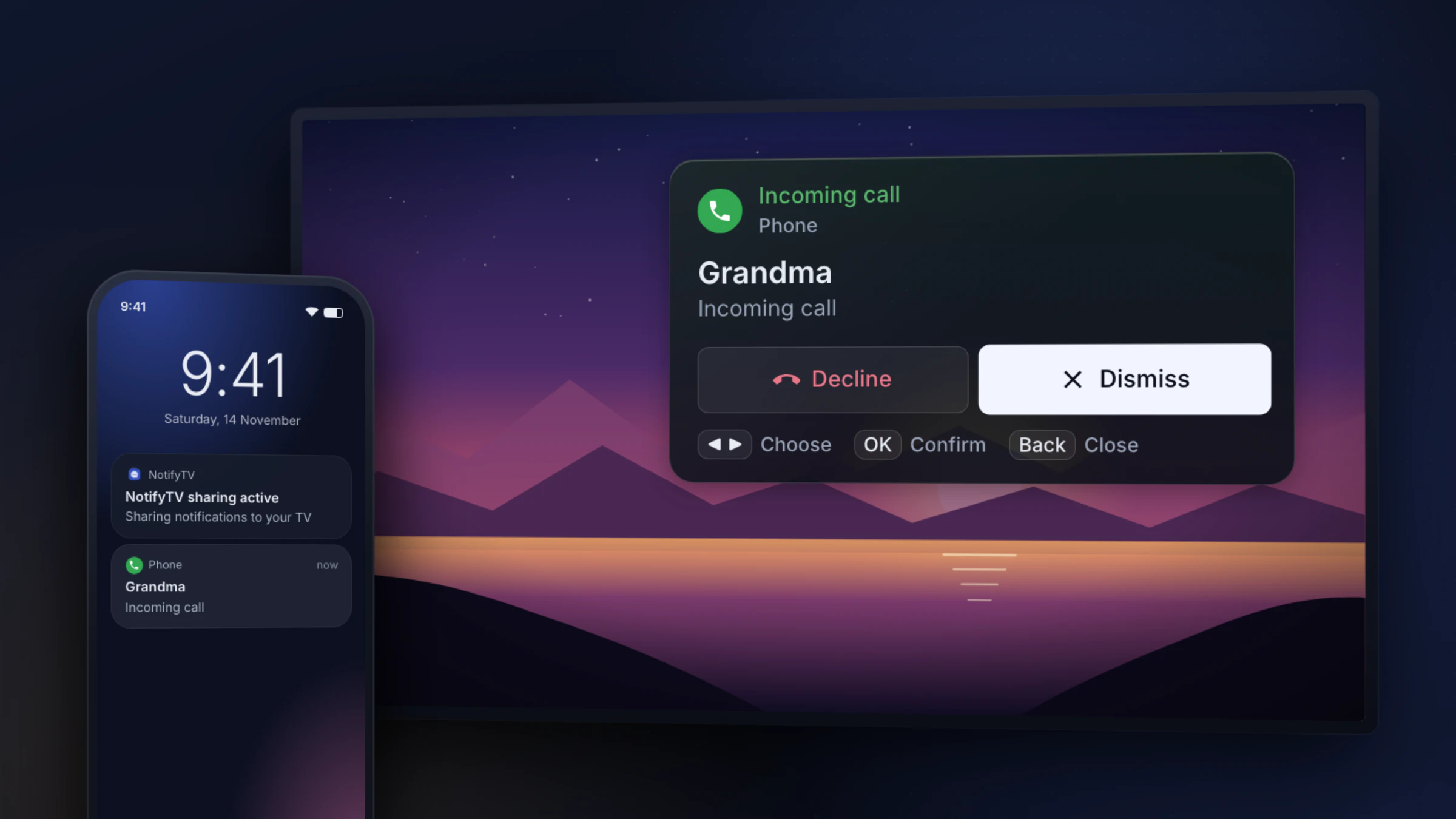
If most calls now ring on your Android phone, NotifyTV shows them on an Android TV or Google TV with the caller’s name, whichever mobile carrier you use.
Only after calls from your mobile? Go straight to how to see incoming calls on your TV. We make NotifyTV and aren’t affiliated with any of the providers below. Provider details were checked on 17 November 2026, with a source for each.
Quick checks to try first
These apply to every provider. Work down the list before you call support.
- Check you still have both services. TV caller ID needs the provider’s home phone service and their TV box. Xfinity, for example, lists Xfinity TV, Xfinity Voice and a compatible box, and says it doesn’t work on TVs with built-in digital tuners, CableCARD devices or TiVo.
- Turn the notification back on. On an Xfinity X1 box it’s Settings > Preferences > Notifications > Xfinity Voice; on Fios it’s Menu > Settings > Notifications > Caller ID. On several providers the setting is per box, so check every TV.
- Restart the TV box. Unplug it for about two minutes, then plug it back in. Xfinity staff suggest this when caller ID disappears after a new modem.
- Check call forwarding. If you forward all home calls to another number, the home line doesn’t ring, so the TV box has no call to show.
- Ask the provider to check your line. If the box settings look right, the feature may need switching on again on the provider’s side. Verizon says new alerts can take 24–48 hours to appear.
Sources: Xfinity: requirements for Caller ID on TV · Xfinity Community, March 2026 (X1 notification fix) · Xfinity Community, February 2025 (restart after a new modem) · Verizon: Caller ID for Fios TV
Does my provider still show caller ID on TV?
What each provider says, checked on 17 November 2026. “Reported” means it comes from someone other than the provider, such as a forum or a retailer.
| Provider | Still offered? | Needs | Known gaps | Source |
|---|---|---|---|---|
| Xfinity (Comcast) | Yes | Xfinity TV (TV Core or higher), Xfinity Voice and a compatible TV box | Not on TiVo, CableCARD devices or a TV’s built-in tuner. An Xfinity employee wrote that it ended on some older equipment in June 2024. | Xfinity: requirements for Caller ID on TV Xfinity Community, July 2024 (employee reply) |
| Spectrum | Yes | Spectrum Voice home phone service | Spectrum’s page doesn’t say which receivers support it. | Spectrum: Spectrum Voice calling features |
| Verizon Fios | Only with Fios Digital Voice | Fios Digital Voice, Fios TV, Fios Internet and Caller ID | Dropped in October 2018 for Fios TV customers without Fios Digital Voice. Not on the Fios TV+ box, the Motorola 2500 or the DCT 700 adapter. | Verizon: Caller ID for Fios TV Verizon notice about the 2018 change (archived) |
| AT&T U-verse TV | Yes | U-verse TV and AT&T phone service | Opened from the Interactive menu or channel 9900. | AT&T: U-verse TV interactive apps (updated 13 March 2026) |
| Cox (now Spectrum) | Yes, on Contour | Cox Voice and a Contour TV box | Cox says it doesn’t work with Cox Mini Boxes. Cox markets are moving to the Spectrum brand. | Cox: using TV Caller ID Light Reading, 20 August 2026 |
| Optimum | Yes | Optimum home phone service and Optimum TV box | No box list on the page we checked. | Optimum: accessibility features |
| DIRECTV (satellite) | Not on newer receivers (reported) | Older receivers used a phone line plugged into the box | No DIRECTV notice found. A satellite equipment retailer wrote in 2020 that receivers made since the mid-2010s don’t have it. | Solid Signal blog, June 2020 |
| DISH | We couldn’t confirm | Older receivers used a phone line plugged into the box | We found no current information for Hopper receivers. | DISH receiver manual (Duo ViP 222) |
| Rogers (Canada) | Not on Ignite TV | Rogers Home Phone and the older Rogers Digital TV service | A Rogers moderator said in January 2023 that TV Call Display isn’t available on Ignite TV. | Rogers Community, January 2023 (archived) Rogers: how to use TV Call Display (archived) |
| TELUS (Canada) | On Optik TV | TELUS Home Phone and Optik TV | Users report it’s missing on the newer TELUS TV Digital Box. | TELUS: use apps on Optik TV TELUS Neighbourhood forum |
Fixes by provider
Xfinity (Comcast)
Xfinity lists three requirements: Xfinity TV (TV Core or higher), Xfinity Voice and a compatible TV box. X1 boxes and many Motorola, Pace and Cisco boxes work; TiVo, CableCARD devices and a TV’s built-in tuner don’t. In July 2024 an Xfinity employee wrote on Xfinity’s forum that caller ID to the TV had ended on some older equipment in June 2024, so an older non-X1 box may be the reason.
On X1, go to Settings > Preferences > Notifications and switch Xfinity Voice on. If it stopped after a new modem or box, unplug the TV box for about two minutes. If that doesn’t bring it back, ask Xfinity to check that the feature is on your account.
Most of your calls ring on your cell now? Get caller ID from your Android phone instead.
Sources: Xfinity: requirements for Caller ID on TV · Xfinity Community, July 2024 (employee reply) · Xfinity Community, March 2026 (X1 notification fix) · Xfinity Community, February 2025 (restart after a new modem)
Spectrum
Spectrum lists Caller ID on TV among its Spectrum Voice calling features: “See who’s calling while you’re watching TV when the name and phone number appear on screen.” It shows calls to your Spectrum Voice home phone. Spectrum’s page doesn’t say which receivers support it, so if caller ID stopped after you changed boxes, ask Spectrum whether your new receiver does.
Most of your calls ring on your cell now? Get caller ID from your Android phone instead.
Source: Spectrum: Spectrum Voice calling features
Verizon Fios
Verizon stopped TV caller ID in October 2018 for Fios TV customers without Fios Digital Voice; caller ID kept working on the home phone itself. Today it needs Fios Digital Voice, Fios TV, Fios Internet and Caller ID, and it doesn’t work on the Fios TV+ box, the Motorola 2500 box or the DCT 700 adapter. On a supported box, turn it on for each box under Menu > Settings > Notifications > Caller ID > Check Availability.
Fios caller ID is for the Fios home phone, not for a Verizon mobile phone. To see calls to your Verizon mobile on the TV, the call has to come from the phone itself.
On Fios TV+, or want calls to your Verizon mobile? Get caller ID from your Android phone instead.
Sources: Verizon: Caller ID for Fios TV · Verizon notice about the 2018 change (archived)
AT&T U-verse
AT&T documents caller ID on the TV for customers with U-verse TV and AT&T phone service. Press the Interactive button on the remote, choose All Interactive, then Phone Services, or tune to channel 9900. If calls don’t show, check that both services are still on your account.
Most of your calls ring on your cell now? Get caller ID from your Android phone instead.
Source: AT&T: U-verse TV interactive apps (updated 13 March 2026)
Cox
Cox documents TV Caller ID for its Contour TV boxes with Cox Voice home phone service. Cox says it doesn’t work with Cox Mini Boxes, and the setting is per receiver, so switch it on for each Contour box. Charter, the company behind Spectrum, completed its purchase of Cox on 20 August 2026 and planned to move Cox markets to the Spectrum brand, so Cox help pages and bills may now say Spectrum.
Most of your calls ring on your cell now? Get caller ID from your Android phone instead.
Sources: Cox: using TV Caller ID with Contour · Cox: using TV Caller ID · Light Reading, 20 August 2026
Optimum
Optimum lists Caller ID on TV among its accessibility features: “incoming phone numbers of callers appear on your TV screen.” It shows calls to your Optimum home phone. The page we checked doesn’t list compatible boxes, so if it disappears after a box swap, ask Optimum to check the feature on your line.
Most of your calls ring on your cell now? Get caller ID from your Android phone instead.
Source: Optimum: accessibility features
DIRECTV
We found no DIRECTV statement about it. Solid Signal, a satellite TV equipment retailer, wrote in June 2020 that DIRECTV hardware made since the mid-2010s, including Genie DVRs, doesn’t have caller ID, and that it’s “probably gone for good”. Older receivers needed a phone line plugged into the box. If yours is newer, the TV box has no way to show calls.
Most of your calls ring on your cell now? Get caller ID from your Android phone instead.
Source: Solid Signal blog, June 2020
DISH
We couldn’t confirm whether current DISH Hopper receivers show caller ID. Older DISH receiver manuals describe caller ID through a phone line connected to the receiver, switched on in the receiver’s setup menu. Ask DISH whether your receiver supports it.
Most of your calls ring on your cell now? Get caller ID from your Android phone instead.
Source: DISH receiver manual (Duo ViP 222)
Rogers
Rogers calls it TV Call Display. It worked with Rogers Home Phone and the older Rogers Digital TV service. On Ignite TV, a Rogers moderator wrote in January 2023 that “The TV Call Display feature is not available on Ignite TV, at this time”, and we found nothing newer.
Most of your calls ring on your cell now? Get caller ID from your Android phone instead.
Sources: Rogers Community, January 2023 (archived) · Rogers: how to use TV Call Display (archived)
TELUS
TELUS supports Call Display on Optik TV for calls to a TELUS Home Phone: press the apps button on the remote and choose Call Display to change its settings. Customers who moved to the newer TELUS TV Digital Box report on TELUS’s forum that caller ID no longer shows on the TV, and we found no TELUS statement either way.
Most of your calls ring on your cell now? Get caller ID from your Android phone instead.
Sources: TELUS: use apps on Optik TV · TELUS Neighbourhood forum
Calls come to your mobile now? Get caller ID on an Android TV or Google TV
Provider caller ID was built for the home phone. If people now call your mobile, the TV box never hears about those calls. NotifyTV takes the call from your phone instead: it’s a pair of free apps, one on your Android phone and one on your Android TV or Google TV. When the phone rings, the TV shows who’s calling over whatever you’re watching. The apps are supported by ads.
- Who’s calling: the name from your contacts, or the number, for regular calls and app calls such as WhatsApp.
- Decline or Dismiss: Press ◀ or ▶ on the remote to choose Decline or Dismiss and OK to confirm. Dismiss is selected by default, so a stray OK never hangs up on anyone. Decline ends regular phone (SIM) calls; for WhatsApp and other app calls, the TV shows who’s calling and you decline on the phone.
- Any mobile carrier: Verizon, T-Mobile, AT&T or another. NotifyTV reads the call from your phone, not from the network.
- Movie night: turn on calls only on the TV and other notifications wait while calls still come through.
- 1
Install NotifyTV on the phone and the TV
Both apps are free on Google Play.
- 2
Allow the Phone permission on your phone
The phone app asks for it during setup. It lets NotifyTV see incoming calls and decline them for you.
- 3
Pair the phone with the TV
Let the phone find the TV on your Wi-Fi, scan the QR code on the TV, or type the TV’s IP address. Calls come through straight away.
The setup guide has the full walkthrough and fixes for common problems, and the calls guide explains everything the call popup does.
Get caller ID from your Android phone
Free on Google Play for Android phones and Android TV / Google TV, supported by ads. No account needed.
Cut the cord? This is where it fits best
If you now stream on a Google TV Streamer, a Chromecast with Google TV or a Sony, TCL or Hisense TV with Google TV, there’s no cable box to show caller ID at all, and Google TV doesn’t show your phone’s calls on its own. Its 2024 call notifications only covered Google Meet, and Google says Meet calling on Android TV ended in early 2025. Calls to your Android phone can still reach the TV through NotifyTV.
Got a TV box from your provider? If it has the Google Play Store on its home screen, check our compatibility page before you rely on it.
Sources: 9to5Google, 16 January 2024 · Google Meet Help
Still have a landline? Send its calls to your Android phone
NotifyTV can’t see your landline or your TV box. It can show a home call that also rings on your Android phone, and many home phone services can arrange that:
- Spectrum Voice: Simultaneous Ring rings up to 5 phones at once, and Forward All Calls sends every call to another number.
- Xfinity Voice: Advanced Call Forwarding sends calls to up to five numbers, your Xfinity Voice number plus four others, set up in your Xfinity Voice settings online.
- AT&T Phone: All Call Forwarding is switched on with *72 and off with *73#.
- Other providers: look for “simultaneous ring” or “call forwarding” in your home phone account, or ask the provider.
Ringing both phones at once keeps the home phone ringing too, so a provider box that still shows caller ID keeps working. Forwarding all calls leaves the home phone silent. Either way the call rings on your mobile, and NotifyTV shows it on the TV. What the TV shows is what your phone shows: the caller’s number or your home number, depending on how your provider passes caller ID on forwarded calls. Try it with a test call first.
Sources: Spectrum: Spectrum Voice calling features · Xfinity: Advanced Call Forwarding · AT&T: home phone star codes (updated 15 July 2025)
Other TVs
- Apple TV 4K can show incoming iPhone calls with tvOS 26 and iOS 26 (Apple). NotifyTV needs an Android phone.
- Samsung, LG, Roku and Fire TV can’t install NotifyTV. A Google TV streaming device plugged into the TV works while you watch through it.
- Every platform side by side: see which TVs can show your phone’s calls, from Apple TV to Roku, with what each one has built in.
- Not sure what your TV runs? Check your TV in a few seconds.
Frequently asked questions
Why did caller ID stop showing on my TV?
TV caller ID from cable and phone companies shows calls to your home phone line, and only on the provider’s own TV box. Things that stop it: a new TV box or modem, the caller ID notification being switched off on the box, a change to your home phone service, or a box that doesn’t support it, such as Verizon’s Fios TV+ box or Rogers Ignite TV. Turn the notification back on, restart the box, then ask your provider to check the feature on your line.
Does Xfinity still have caller ID on TV?
Yes, when we checked on 17 November 2026. Xfinity lists Xfinity TV (TV Core or higher), Xfinity Voice and a compatible TV box: X1 and many Motorola, Pace and Cisco boxes, but not TiVo, CableCARD devices or a TV’s built-in tuner. An Xfinity employee wrote in July 2024 that it had ended on some older equipment in June 2024. On X1, check Settings > Preferences > Notifications > Xfinity Voice.
Does Fios have caller ID on TV?
Only with Fios Digital Voice. Verizon requires Fios Digital Voice, Fios TV, Fios Internet and Caller ID, and it doesn’t work on the Fios TV+ box, the Motorola 2500 or the DCT 700 adapter. Verizon stopped TV caller ID for Fios TV customers without Fios Digital Voice in October 2018. On a supported box, turn it on under Menu > Settings > Notifications > Caller ID.
Does Spectrum have caller ID on TV?
Yes. Spectrum lists Caller ID on TV among its Spectrum Voice calling features (checked on 17 November 2026). Its page doesn’t say which receivers support it, so if it stopped after a box change, ask Spectrum whether your receiver does.
Can I get caller ID on a smart TV without cable?
Not from a cable company: their TV caller ID needs their home phone service and their TV box. If your TV runs Google TV or Android TV with Google Play, NotifyTV can show the calls that ring on your Android phone, with the caller’s name. Apple TV 4K can show iPhone calls with tvOS 26. NotifyTV doesn’t run on Samsung, LG, Roku or Fire TV, unless you plug in a Google TV streaming device.
Can my TV show calls from my cell phone?
Yes, if the phone is an Android phone (Android 8.0 or newer) and the TV runs Google TV or Android TV with Google Play. Install NotifyTV on both and pair them on the same Wi-Fi. Calls show with the caller’s name or number, for regular calls and app calls such as WhatsApp. You can decline regular phone calls with the TV remote; you answer on the phone.
Does NotifyTV work with my landline?
Not directly. NotifyTV only sees calls that ring on your Android phone. If your home phone service can ring several phones at once or forward calls (for example Spectrum’s Simultaneous Ring or Xfinity’s Advanced Call Forwarding), add your mobile number: home calls then ring on your phone too and show on the TV. Whether the TV shows the caller’s number or your home number depends on how your provider passes caller ID on forwarded calls.