Guide
Can your TV show your phone calls? Every platform, checked
Apple TV 4K now shows iPhone calls. Google TV and Android TV can show calls from an Android phone with an app. On Samsung, LG, Roku and Fire TV we found no built-in feature for your phone’s calls. Here’s what each platform can do, with a source for each claim.
Updated
Short answer
- iPhone and Apple TV 4K: yes, built in. With iOS 26 and tvOS 26 the TV shows incoming iPhone calls, and you can put a call on hold or answer it on a HomePod.
- Android phone and Google TV or Android TV: yes, with an app. It isn’t built in, but NotifyTV shows who’s calling and the messages you choose.
- Samsung, LG, Roku and Fire TV: mostly no for calls. We found no built-in feature that shows your phone’s calls or texts. Some show doorbell alerts, and a Google TV streaming device plugged into the TV fills the gap for Android phones.
We make NotifyTV, an app for Android phones and Android TV or Google TV, so we’ve kept other companies’ features to what their own pages and the tech press say. Everything about other platforms was checked on 17 November 2026, with a source for each.
Which TVs can show your phone’s calls, messages and doorbell?
| Your TV runs | Phone calls | Messages and app alerts | Doorbell alerts |
|---|---|---|---|
| Apple TV 4K tvOS, with an iPhone | Yes, from an iPhone (iOS 26 and tvOS 26): see the call, put it on hold or answer on a HomePodApple: manage incoming iPhone calls on Apple TV 4K | Not in Apple’s guide, which covers calls only. We couldn’t find a feature for iPhone textsApple: manage incoming iPhone calls on Apple TV 4K | Yes, from supported doorbell cameras set up in Apple HomeApple: cameras in the Apple Home tab on Apple TV 4K |
| Google TV / Android TV, built in Sony, TCL, Hisense, Philips, Google TV Streamer, Chromecast with Google TV | No. The 2024 call notifications were for Google Meet, and Meet calling on Android TV ended in early 2025Google Meet Help | We couldn’t find a built-in feature | Yes, Nest Doorbell alerts through the Home panel9to5Google, 28 April 2025 |
| Google TV / Android TV with NotifyTV With an Android phone; both apps free on Google Play | Yes: the caller’s name or number. Decline a ringing phone (SIM) call with the remoteOur calls guide | Yes: WhatsApp, texts and any app you chooseOur WhatsApp guide | Your doorbell app’s phone alert, as text without a camera pictureOur setup guide |
| Samsung Tizen | No official feature we could find. SmartThings can mute the TV when a Galaxy phone ringsSamMobile, 24 November 2022 | SmartThings alerts. We found nothing for your phone’s textsSamsung: SmartThings notifications on your TV | Ring Doorbell Pro on 2022 and newer TVs, through SmartThingsSamsung: Ring Doorbell Pro with your smart TV |
| LG webOS | No official feature we could find. LG’s webOS page lists noneLG: what is webOS? | Sports Alert scores and Home Hub. We found nothing for your phone’s textsLG: what is webOS? | We couldn’t find a built-in feature |
| Roku Roku TVs and players | No official feature we could find | We couldn’t find a built-in feature | Yes, from Roku’s own smart home doorbells and camerasTom’s Guide, 15 October 2024 |
| Fire TV Fire TV Stick, Fire TV Cube, Fire TV smart TVs | Not built in that we could find. A third-party app, Notifications for Fire TV, says it shows callsNotifications for Fire TV on Google Play | Through that same third-party app, installed on the phone and the Fire TVNotifications for Fire TV on Google Play | Ring doorbell live view in a corner of the screen, on select models through AlexaAFTVnews, 17 December 2020 |
Checked on 17 November 2026. “We couldn’t find” means we looked at the company’s help pages and news coverage and found no such feature. If we missed one, tell us and we’ll update the table.
Apple TV 4K: yes for iPhone calls
Since tvOS 26, Apple TV 4K can show notifications for incoming phone and FaceTime audio calls from your iPhone. You can put the call on hold until you get to the iPhone, or answer it on a HomePod connected to the Apple TV. It needs iOS 26 or later on the iPhone and tvOS 26 or later on the Apple TV; Apple’s guide shows the settings on both (Show Incoming Calls on the Apple TV, Calls on Other Devices on the iPhone).
Apple’s guide covers calls, not text messages, and we couldn’t find an Apple TV feature that shows iPhone texts. For doorbells, Apple TV can show a notification when a supported doorbell camera in the Apple Home app sees someone at your door. NotifyTV needs an Android phone and doesn’t run on Apple TV.
Sources: Apple: manage incoming iPhone calls on Apple TV 4K · Apple: cameras in the Apple Home tab on Apple TV 4K
Google TV and Android TV: not built in, but an app can do it
Google TV and Android TV don’t show your phone’s calls or texts on their own. Google TV gained a Call notifications setting in early 2024, but it was for Google Meet calls, and Google says Meet calling on Android TV ended in early 2025. We found nothing that replaced it for regular calls.
What Google TV does show natively is Nest Doorbell alerts, through the Home panel on Google TV Streamer, on Chromecast with Google TV (rolling out from April 2025) and on other Google TV sets. Google’s help says visitor notifications need a connected doorbell in your Google Home.
Because these TVs install apps from Google Play, this is where apps fill the gap. With an Android phone, NotifyTV shows calls with the caller’s name, plus messages and alerts from the apps you choose (see below). Other apps do similar jobs; our comparison of notification apps for Android TV sets them side by side.
Sources: 9to5Google, 16 January 2024 · Google Meet Help · 9to5Google, 28 April 2025 · Google TV Help: control smart home devices
Samsung TVs (Tizen): no phone calls we could find
We found no official Samsung feature that shows your phone’s calls and texts on a Samsung TV. Samsung does document three things that come close:
- SmartThings alerts: alerts from SmartThings services and devices can appear on the TV (Settings > Notifications).
- ConnecTime: on 2023–2025 Samsung TVs, a call in Samsung’s ConnecTime video-calling app shows a notification on the TV. These are calls made in the ConnecTime app, not your regular phone calls.
- Ring Doorbell Pro: on 2022 and newer Samsung TVs, a ring or motion shows a notification on the TV through SmartThings. Samsung ended Ring support on 2018–2021 TVs on 13 February 2024.
Separately, SmartThings on a Galaxy phone can mute a Samsung TV when you make or receive a call, as SamMobile described in 2022. It mutes the TV; it doesn’t show who’s calling. Samsung TVs can’t install Google Play apps, so NotifyTV doesn’t run on them.
Sources: Samsung: SmartThings notifications on your TV · Samsung: use the ConnecTime app · Samsung: Ring Doorbell Pro with your smart TV · SamMobile, 24 November 2022
LG TVs (webOS): no official feature we could find
We couldn’t find an official LG feature that shows your phone’s calls or texts on an LG TV (checked on 17 November 2026). LG’s webOS page describes Sports Alert, which shows live scores and game notifications while you watch, and Home Hub, which controls smart home devices from the TV. Neither shows who’s calling. We also found no official doorbell alert for LG TVs.
Screen Share mirrors your whole phone screen to the TV, which isn’t the same as a call alert: everything on the phone is on the big screen while it runs (more in notifications without screen mirroring). LG TVs can’t install Google Play apps, so NotifyTV doesn’t run on them.
Source: LG: what is webOS?
Roku: doorbell alerts, but no phone calls we could find
We couldn’t find an official Roku feature that shows your phone’s calls or texts on a Roku TV or player (checked on 17 November 2026). What Roku does show are its own smart home alerts: a Roku TV or streaming player can pop up a notification when someone rings a Roku video doorbell, and since October 2024, Tom’s Guide reported, for all Roku Smart Home cameras too.
Roku can’t install Google Play apps, so NotifyTV doesn’t run on it.
Source: Tom’s Guide, 15 October 2024
Amazon Fire TV: a third-party app, and Ring through Alexa
We found no built-in Fire TV feature that shows your phone’s calls or texts. A third-party app, Notifications for Fire TV, forwards notifications from an Android phone to a Fire TV and says it “also shows incoming and outgoing phone calls” (its Google Play listing, last updated 11 July 2025). You install it on the phone and on the Fire TV.
For doorbells, a Ring video doorbell can show its live view in a corner of the screen on select Fire TV models through Alexa. AFTVnews reported it in December 2020, starting with the 2nd-generation Fire TV Cube. NotifyTV doesn’t run on Fire TV, which has no Google Play.
Sources: Notifications for Fire TV on Google Play · AFTVnews, 17 December 2020
Cable or satellite TV box: home phone calls only
Some cable providers show caller ID on their own TV box, but only for calls to your home phone line, not your mobile, and not on every box. Our guide to caller ID on TV that stopped working covers Xfinity, Spectrum, Fios and other providers one by one.
Android phone and a Google TV? See who’s calling with NotifyTV
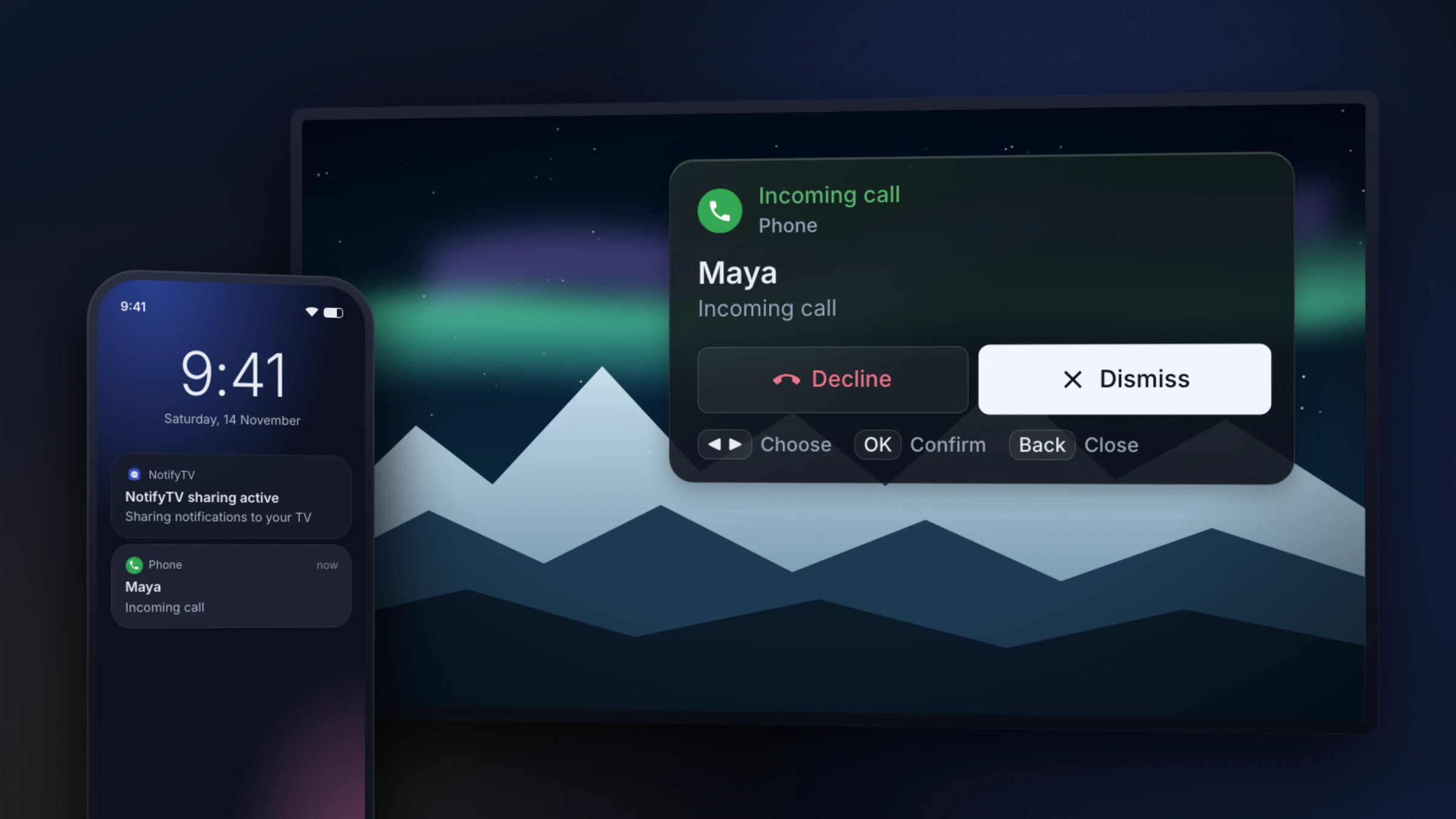
NotifyTV is a pair of free apps, one on your Android phone and one on your Android TV or Google TV. When the phone rings, the TV shows who’s calling over whatever you’re watching, and messages from the apps you pick pop up the same way. The apps are supported by ads.
- Who’s calling: the name from your contacts, or the number, for regular calls and app calls such as WhatsApp.
- Decline or Dismiss: Press ◀ or ▶ on the remote to choose Decline or Dismiss and OK to confirm. Dismiss is selected by default, so a stray OK never hangs up on anyone. Decline ends a regular phone (SIM) call while it’s ringing; for WhatsApp and other app calls, the TV shows who’s calling and you decline on the phone.
- Messages and alerts: WhatsApp, texts and other common messaging apps are switched on already. Add any other app, such as your doorbell app, and its alerts show as text.
- Movie night: turn on calls only on the TV and other notifications wait while calls still come through.
The setup guide walks through installing and pairing both apps, and the calls guide explains everything the call popup does.
See who’s calling on your Google TV
Free on Google Play for Android phones and Android TV / Google TV, supported by ads. No account needed.
Samsung, LG, Roku or Fire TV with an Android phone?
Plug in a Google TV streaming device, such as Google TV Streamer, Chromecast with Google TV or an onn. Google TV box, and install NotifyTV on it. Calls and messages then appear while you’re watching through that device, but not in the TV’s own apps.
Have an iPhone?
NotifyTV doesn’t work with iPhone: iOS doesn’t let apps read other apps’ notifications. If you have an Apple TV 4K, use Apple’s own incoming calls feature with iOS 26 and tvOS 26 (Apple’s guide). On the other platforms in this guide, we didn’t find a built-in way to show iPhone calls.
Frequently asked questions
Can Samsung TVs show phone calls?
Not that we could find (checked on 17 November 2026). Samsung documents SmartThings alerts on the TV, ConnecTime video-call alerts on 2023–2025 TVs and Ring Doorbell Pro alerts on 2022 and newer TVs, but no feature that shows your phone’s calls or texts. SmartThings on a Galaxy phone can mute a Samsung TV when a call comes in, without showing who’s calling. With an Android phone, plug a Google TV streaming device into the Samsung TV and NotifyTV shows your calls while you watch through it.
Can I see who’s calling on my Roku?
Not with a Roku feature that we could find (checked on 17 November 2026). Roku TVs and players show alerts from Roku’s own smart home doorbells and cameras, not phone calls. Roku can’t install Google Play apps, so NotifyTV doesn’t run on it, but a Google TV streaming device plugged into the same TV can show calls from an Android phone while you watch through it.
Can LG TVs show phone calls?
Not that we could find (checked on 17 November 2026). LG’s webOS page describes Sports Alert notifications and Home Hub control of smart home devices, but nothing that shows your phone’s calls or texts. LG TVs run webOS, which can’t install Google Play apps; with an Android phone, a Google TV streaming device plugged into the TV is the way to see calls.
Does Google TV show phone calls?
Not on its own. Google TV’s 2024 call notifications were for Google Meet calls, and Google says Meet calling on Android TV ended in early 2025. Google TV does show Nest Doorbell alerts through its Home panel. To see calls from an Android phone, install NotifyTV on the TV and the phone: the TV shows the caller’s name or number, and you can decline a ringing phone (SIM) call with the remote.
Can Apple TV show iPhone calls?
Yes. With iOS 26 or later on the iPhone and tvOS 26 or later on an Apple TV 4K, the TV shows incoming phone and FaceTime audio calls. You can put the call on hold until you answer on the iPhone, or answer it on a HomePod connected to the Apple TV. Apple’s guide doesn’t mention text messages. NotifyTV doesn’t work with iPhone or Apple TV.
Can my TV show WhatsApp messages?
No TV has a WhatsApp app. On a TV with Android TV or Google TV, NotifyTV shows WhatsApp messages and calls from an Android phone as popups while you watch. On other TVs you can mirror your phone to watch a WhatsApp video, but that puts your whole screen on the TV.